
- Login to the Cyan Web Portal as a tenant Admin (https://portal.cyan.us.com/)
- Go to Manage Users, click the Create New button in the upper right.
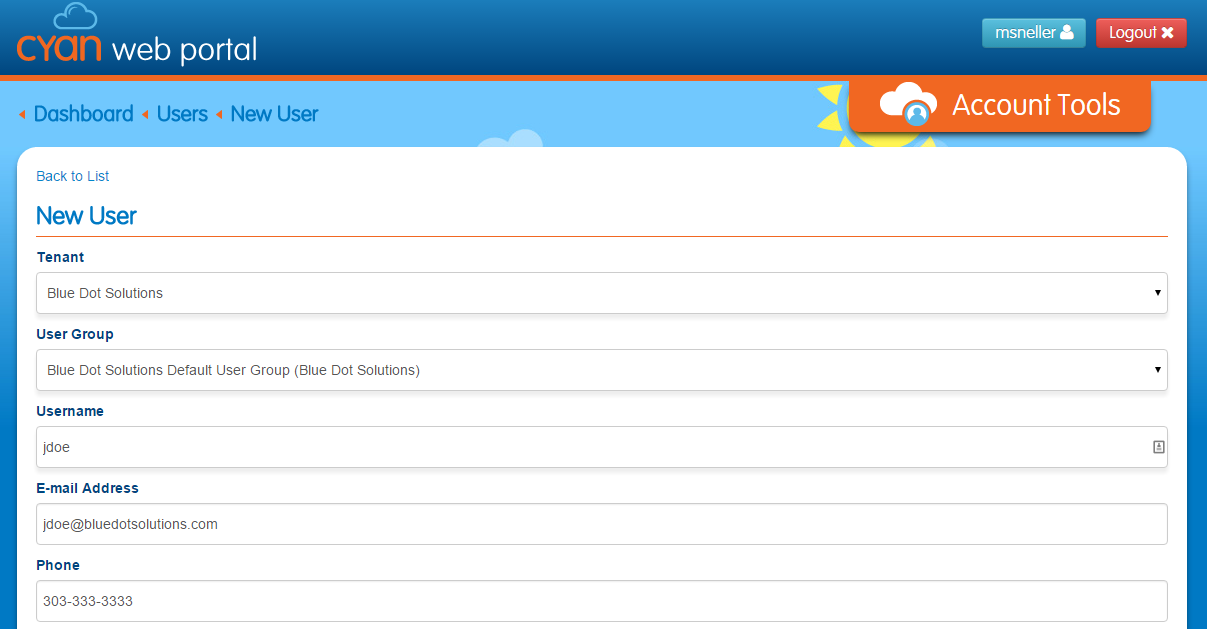
- Verify that your Tenant name and default user group is selected. (Required)
- Enter User Name (Required)
- Enter Email Address
- Enter Phone
- Enter a Password (Required)
- Select a Role ID
 See below for role id details
 - Enter a Description (Optional)
- Select the Create button.

| Role | Description |
| Tenant Admin | Can create users, manage nodes (raw data), messages, devices, device groups, custom pages, and integration settings. |
| Tenant Dispatcher | Can only view custom pages. |
| Tenant Registrar | Can create users, manage devices, device groups.. |
| Tenant User | No web portal access. Tenant users can only access Cyan applications via the api. Tenant users will typically be your application end users or engine user account. |
Comments
0 comments
Please sign in to leave a comment.